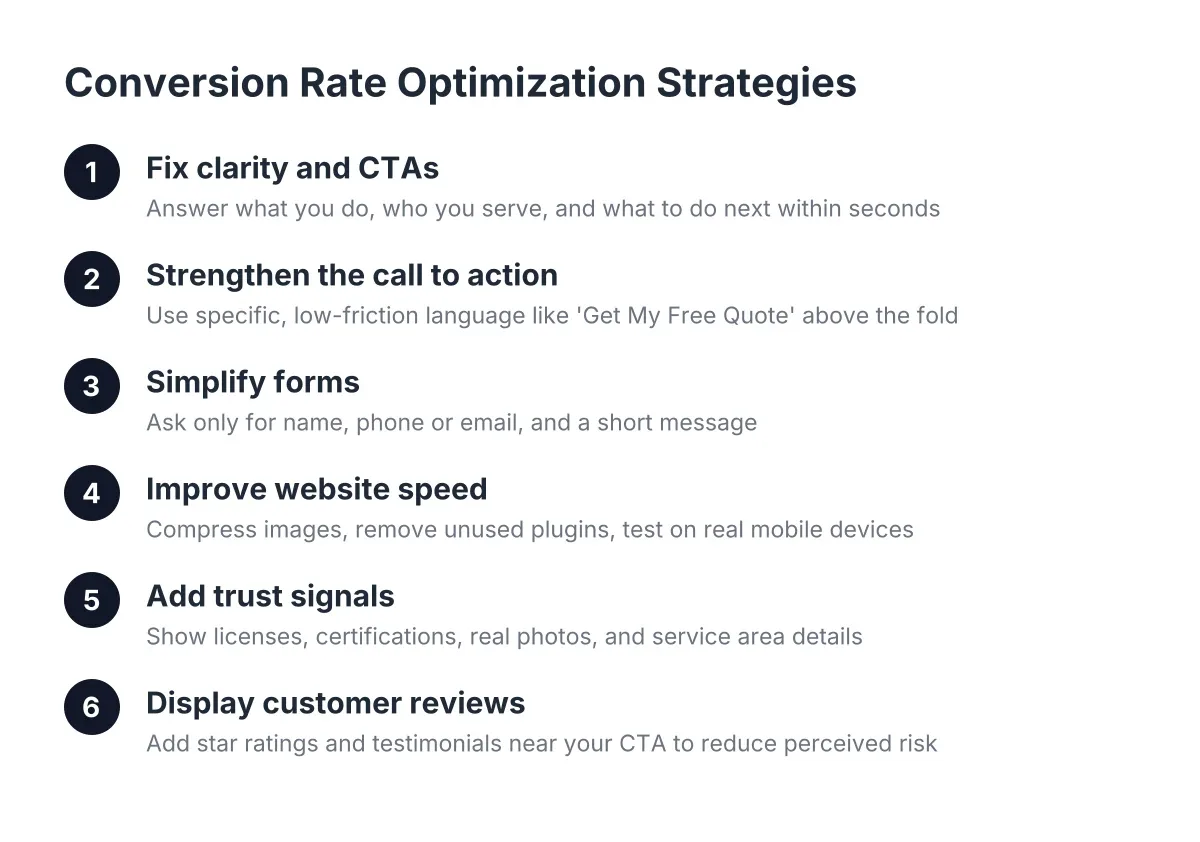
Website Conversion Optimization — Complete Guide
Your website gets visitors, but the phone stays quiet. That gap between traffic and booked jobs is where conversion rate optimization strategies earn their keep. This guide covers the four levers that matter most for a local service business: calls to action, forms, page speed, and trust signals like customer reviews. Along the way, you'll learn why your site probably isn't converting and exactly what to fix first. If you already have a website and want more leads from it, this page is your starting point.
What You'll Find in This Guide
Coming soon — we're building out this topic cluster.
Why Isn't My Website Converting? Start With Clarity and CTAs
Most local business websites don't fail because they look bad. They fail because visitors can't figure out what to do next. Someone lands on your homepage, skims for five seconds, and leaves without ever seeing a reason to call. That's a clarity problem, not a traffic problem.
To put it simply, your website has one job: move a visitor from "just browsing" to "booked appointment." Every page needs to answer three questions fast. What do you do? Who do you serve? What should I do next? If a stranger can't answer all three within seconds of landing, your conversion rate will suffer no matter how much traffic you buy.
Improving Conversion Through the Best Call to Action
A strong call to action is specific, visible, and low friction. "Submit" and "Learn More" ask nothing and promise nothing. Instead, use action language tied to a real outcome: "Get My Free Quote," "Book an Inspection," or "See Pricing." The best call to action for a service business website tells the visitor exactly what happens after they click.
Placement matters just as much as wording. Your primary CTA belongs above the fold on every page, repeated after each major section, and pinned in your mobile navigation. Because most local searches happen on phones, a tap-to-call button should be one thumb away at all times.
Forms deserve the same scrutiny. Every extra field costs you leads, so ask only for what you need to respond: name, phone or email, and a short message. You can gather project details on the call. Additionally, confirm the submission with a clear next step, such as "We'll call you within one business hour." That single sentence sets expectations and reduces the anxiety that kills follow-through.
Finally, audit your pages for competing asks. A homepage with six buttons pointing six directions converts worse than one with a single dominant path. When optimizing strategies for conversion rates, work best when you remove choices, not add them. Pick the one action you want, make it obvious, and let everything else on the page support it.
Website Speed and Conversions: The Silent Lead Killer
You can write the perfect headline and still lose the lead before anyone reads it. Speed is the gatekeeper of every other conversion tactic. According to Google, 40% of consumers will abandon a webpage that takes longer than three seconds to load. That means a slow site turns away nearly half your visitors before your offer ever appears.
The damage compounds on mobile, where most local searches happen. Google found that median mobile load times for sessions where users bounced were about 2.5 seconds slower than for sessions where they didn't. In practice, a few seconds of lag is often the entire difference between a bounce and a booked call.
Beyond the immediate lost lead, slow performance poisons the well for return visits. According to Google, 79% of shoppers who are dissatisfied with a site's performance say they are less likely to purchase from that site again. As a result, one bad first impression can cost you a customer permanently, not just today.
What Actually Slows Local Business Websites Down
The usual culprits are predictable. Oversized images top the list, especially full-resolution photos uploaded straight from a phone. Bloated page builders and stacked plugins come next, followed by cheap shared hosting that buckles under even modest traffic. However, none of these require a rebuild to fix.
Start with the basics. Compress and resize every image before it goes live. Remove plugins and scripts you don't actively use. Then test your site on a real phone over cellular data, not office wifi, because that's how your customers experience it.
That said, speed audits reveal a hard truth for many owners: the platform itself is the bottleneck. A mobile-first site built with performance in mind will outconvert a patched-up slow one every time. With this in mind, treat speed as a conversion feature, not a technical afterthought. Among all conversion rate optimization strategies, fixing load time delivers the fastest measurable return because it lifts every page at once.
Website Trust Signals: Conversion Rate Optimization Strategies That Compound
Speed gets visitors to your content. Clarity tells them what to do. Trust is what makes them actually do it. Before anyone hands over their phone number, they need evidence that you're a real, competent business that treats customers well. Website trust signals supply that evidence.
The strongest trust signal for a local service business is customer reviews, displayed prominently on your own site. Star ratings near your CTA, short testimonial quotes with real names, and a live feed of recent reviews all reduce the perceived risk of contacting you. For example, a quote request form sitting next to forty recent five-star reviews converts very differently than the same form on a bare page.
Beyond reviews, layer in the supporting signals. Show your license numbers, insurance, and certifications. Additionally, display real photos of your team and your work instead of stock images. List your physical service area, add a visible phone number, and include badges from platforms where you already hold strong ratings. Each element answers a quiet objection in the visitor's head.
How to Add Reviews to Your Website the Right Way
The mistake most owners make is treating reviews as a one-time copy-and-paste job. Static testimonials from three years ago read as stale, and visitors notice. Instead, automate the flow: request a review after every completed job, then sync new reviews to your site so the proof stays fresh without manual work. QR review devices at the point of service make the ask effortless for both you and the customer.
Responding to reviews matters almost as much as collecting them. According to BrightLocal, 88% of consumers say they would use a business that replies to all of its reviews, compared to just 47% for one that never responds. In other words, your public replies are themselves a trust signal that future customers read closely.
One caution as you build this system: keep it honest. The FTC's rule on consumer reviews prohibits fake or incentivized reviews, and the penalties are real. Fortunately, you don't need shortcuts. A consistent, automated ask sent to every genuine customer will outperform any gimmick, and it compounds month after month.
This is where conversion rate optimization strategies stop being isolated tweaks and start working as a system. Fresh reviews improve your site's conversion rate. A faster, clearer site earns more customers, who generate more reviews. Each fix feeds the next.
Ready to Get Started?
You don't need a bigger marketing budget to get more leads. You need a website that loads fast, asks clearly, and proves you're worth trusting. We build exactly that: custom, mobile-first websites paired with automated review collection, so your best customers do the convincing for you. Reach out and we'll show you where your current site is leaking leads and how to plug the gaps.