What Is Conversion Rate? Why Your Phoenix, AZ Website Isn’t Booking Jobs
If your website gets traffic but your phone stays quiet, the problem has a name. What is conversion rate? It is the percentage of visitors who take the action you want, like calling, filling out a form, or booking a job. For most local service businesses in Phoenix, AZ, this one number explains why a competitor with a worse truck and worse work is booking the customers you should have. This guide breaks down what the number means, why yours is probably low, and the specific fixes, especially the one most owners skip: putting your reviews to work on your site.
What Is Conversion Rate, in Plain English?
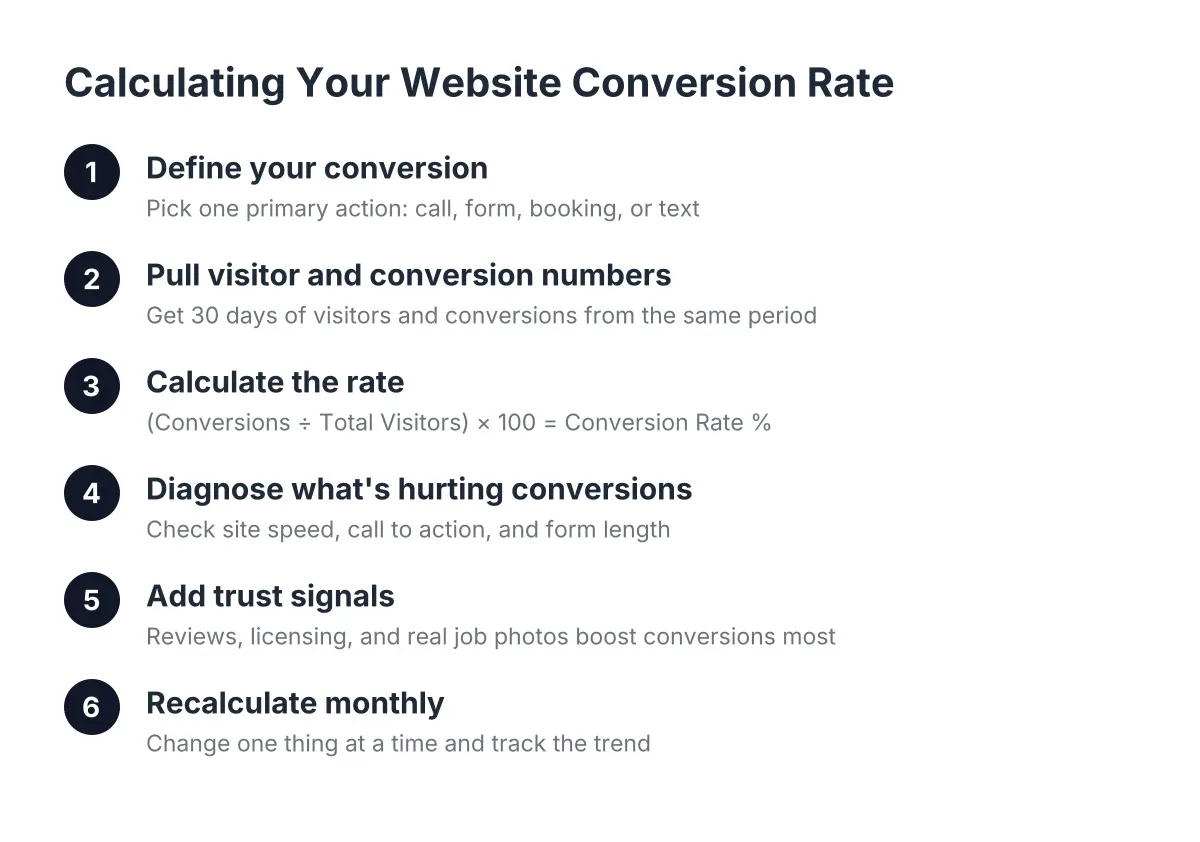
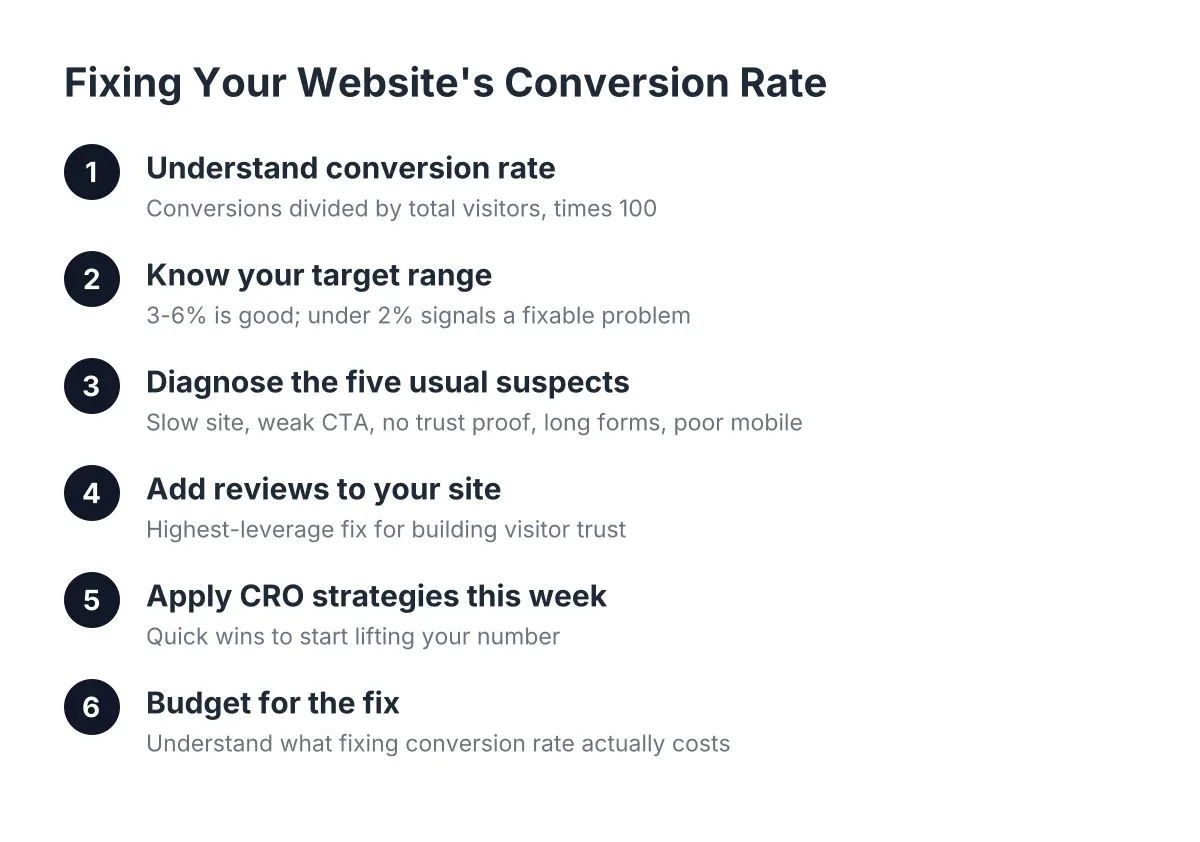
Conversion rate is the percentage of website visitors who complete a specific goal, calculated by dividing conversions by total visitors and multiplying by 100. If 200 people visit your site this month and 6 of them call or submit a form, your conversion rate is 3%. That is the whole concept. No dashboard required.
The conversion rate formula looks like this:
Conversion rate = (conversions ÷ total visitors) × 100
A "conversion" is whatever action means money for you. For a Phoenix HVAC company, it is probably a phone call or a "schedule service" form. For a landscaper, it might be a quote request. It is not page views, and it is not time on site. Those metrics feel productive but do not pay for payroll.
Here is why this number matters more than traffic. Suppose a plumber in Phoenix, AZ gets 500 visitors a month and converts 1% of them. That is 5 leads. If he doubles traffic through ads or SEO, he gets 10 leads and pays for every extra visitor. If instead he doubles his conversion rate to 2%, he also gets 10 leads, from the same traffic, for free, forever. That is the math behind conversion rate optimization, and it is why fixing your site usually beats buying more clicks.
One quick note on terminology. When you search for information about conversion rates, you will find articles about currency exchange and even shooting accuracy in FC 26 and soccer. Same word, different worlds. In marketing and sales, conversion rate always means visitors who became leads or customers. That is the version that fills your schedule.
What Counts as a Good Conversion Rate for a Local Service Business?
A good conversion rate for a local service business website generally lands between 3% and 6%, though a focused site with strong reviews and clear calls to action can hit 10% or more. Anything under 2% usually signals a fixable problem with trust signals, page speed, or your call to action, not a traffic problem.
Do not obsess over industry benchmarks, though. Your real benchmark is your own number last month. If you are converting at 1.5% now and hit 3% in 90 days, you just doubled your leads without spending another dollar on ads. That is the goal.
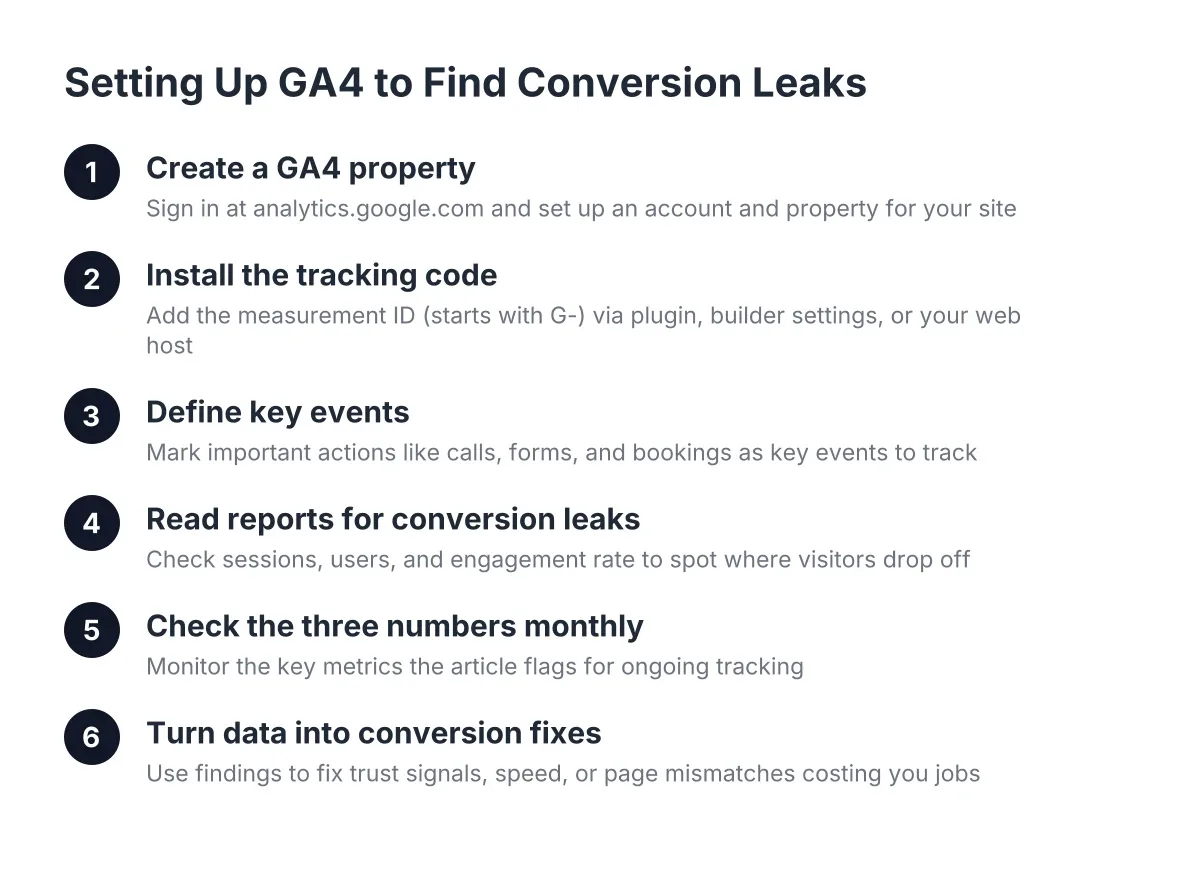
To find your current number, check your Google Analytics or your website dashboard for monthly visitors, then count the calls and form submissions you can trace to the site. Divide, multiply by 100, write it down. Now you have a baseline, and everything below is about moving it.
Why Isn't My Website Converting? The Five Usual Suspects
A website fails to convert for a handful of predictable reasons: it loads slowly, buries the call to action, hides pricing and process, shows no proof that real customers trust you, or breaks on a phone. Most underperforming local business sites have three or more of these problems at once, and each one is fixable.
Let's take them in order of how often they show up.
1. Your site is slow. According to Google, 40% of consumers will abandon a webpage that takes longer than three seconds to load. Nearly half your potential customers gone before they see a single word. Oversized photos, cheap hosting, and bloated page builders are the usual causes. Website speed and conversions are joined at the hip; you cannot fix one while ignoring the other.
2. Your call to action is weak or missing. The best call to action for a service business website is specific and low-friction: "Call Now," "Get a Free Quote," or "Book Service Today." Many sites bury a generic "Contact Us" link in the footer and call it a day. Your primary CTA should sit in the top section of every page, repeat as the visitor scrolls, and be a tappable phone number on mobile.
3. You show no proof anyone trusts you. This is the big one, and it gets its own section below. A visitor comparing three Phoenix contractors will pick the one whose site shows dozens of recent 5-star reviews. Every time.
4. Your forms ask too much. A quote form with nine required fields converts worse than one with three. Name, phone, and a one-line description of the job. You can get the rest on the call.
5. Your site breaks on phones. Most local searches happen on a phone, often from a driveway or a job site. If a visitor has to pinch and zoom to find your number, they hit the back button and call the next result. Mobile-first design is not a nice-to-have in 2026; it is the baseline.
However, before you touch any of these, check one thing: do you have a real website at all? According to BrightLocal, despite 89% of small and midsize businesses investing in organic SEO, only 40% say they have a dedicated business website. If you are running your business off a Facebook page, that is the first fix.
Reviews Are Your Highest-Leverage Conversion Fix
Displaying customer reviews on your website is the single highest-leverage conversion improvement for a local service business, because visitors are not asking "can this company do the work?" They are asking "can I trust them in my home?" Reviews answer that question in a way no headline or stock photo can.
Think about how you buy. When you needed a new dentist or a roofer, you read reviews before you did anything else. Your customers do the same thing. If your website makes them leave to go check your reviews on Google, some of them never come back. They see a competitor in the search results with 200 reviews to your 40, and your lead becomes their booked job.
The fix is to bring the proof to the visitor instead of hoping the visitor goes looking for it. Here is what that looks like in practice:
- Put a review widget on your homepage that pulls in your live Google reviews, star rating, and review count. Fresh, dated reviews beat a wall of static quotes from 2021.
- Place reviews next to every call to action. A "Book Now" button sitting beside three recent 5-star reviews converts better than the same button alone. Proof reduces hesitation at the exact moment of decision.
- Match reviews to services. On your AC repair page, show reviews that mention AC repair. Specificity reads as credibility.
- Show recency. A review from last Tuesday says "this business is active and still good." Twelve reviews from three years ago raise questions.
Responding to reviews matters almost as much as collecting them. According to BrightLocal, 88% of consumers say they would use a business that replies to all of its reviews, compared to just 47% for a business that never responds. That is a 41-point trust gap you can close in ten minutes a week, or automate entirely.
There is a catch, and it is the reason review sections on most small business sites look sad. You cannot display reviews you never collected. Most owners are great at the work and terrible at asking for the review afterward, not from laziness, from being busy. This is where automation earns its keep: a system that texts the customer a review link right after the job, follows up once, and routes new 5-star reviews onto your website without you touching anything. A QR code on the invoice or in the truck does the same thing for face-to-face jobs. The businesses stacking 15 to 30 new reviews a month in Phoenix are not luckier than you; they just stopped relying on memory.
Beyond reviews, round out your trust signals: license numbers, insurance, years in business, real photos of your crew and your work, and any local Phoenix, AZ affiliations. Stock photos of models in hard hats convince no one. A photo of your actual van on an actual Scottsdale driveway does.
How Conversion Rate Improvements Play Out: A Phoenix, AZ Example
Say a solo garage door repair operator in Phoenix, AZ gets about 400 website visitors a month and converts 1% of them. That is 4 leads. His site loads in six seconds, has a "Contact" page as the only CTA, and shows zero reviews even though he has 60 sitting on Google. Sound familiar?
Suppose he makes three changes over one month. He moves to fast hosting and compresses his images, cutting load time under three seconds. He adds a tappable "Call Now" button and a three-field quote form to the top of every page. And he installs a live review widget showing his Google rating and pulls his best reviews onto his service pages.
In that scenario, a jump from 1% to 3% is a realistic outcome; these are estimates, not guarantees, but they reflect how these fixes typically compound. Same 400 visitors, now 12 leads instead of 4. If his average job is $350 and he closes half his leads, that is roughly $1,400 more revenue per month from a website that used to embarrass him. No new ad spend. That is what conversion rate optimization strategies look like when they are grounded in a real business instead of a marketing deck.
The honest caveat: results vary with your market, your review base, and your close rate. If your site has deep structural problems, a hacked-together theme, a domain penalty, or no mobile version at all, patching it can cost more than rebuilding it. That is a judgment call worth making with a professional rather than guessing.
Conversion Rate Optimization Strategies You Can Start This Week
Website conversion optimization does not require a big-agency retainer or a six-month roadmap. It requires a short list of fixes, done in the right order, and a way to measure whether they worked. Here is the sequence that makes sense for a small local operation:
- Measure your baseline. Pull last month's visitor count and lead count. Calculate your conversion rate with the formula above. You cannot improve a number you have never seen.
- Fix speed first. Test your site on your own phone using cell data, not office Wi-Fi. If it takes more than three seconds, compress your images and evaluate your hosting before touching anything else.
- Rewrite your calls to action. One primary action per page, stated as a verb: "Call Now for Same-Day Service." Put it above the fold, make the phone number tappable, and repeat it near the bottom.
- Cut your forms to three fields. Name, phone, and what they need. Every extra field is a reason to bail.
- Add live reviews to your homepage and service pages. Widget, star rating, review count, recent dates. If your review count is thin, start the collection system first; the display gets stronger every week after.
- Automate review collection and responses. Text-based requests after each job, a QR device for in-person asks, and automated replies so every review gets answered. This is the flywheel that keeps working while you are on a roof or under a sink.
- Recheck in 30 days. Same formula, new numbers. Keep what moved the needle.
You will notice ecommerce best practices preach the same fundamentals: fast pages, clear CTAs, visible social proof, short checkout flows. The principles transfer; only the conversion outcome changes from a cart checkout to a booked service call.
One more overlooked lever: your Google Business Profile. According to BrightLocal, only 35% of small and midsize businesses have one. If you are in the 65% without a profile, claiming it is free, takes an afternoon, and feeds the review engine everything above depends on.
What Fixing Your Conversion Rate Actually Costs
Fixing a local business website's conversion rate in 2026 typically costs anywhere from a few hundred dollars in DIY tweaks to a few thousand for a professional rebuild with review automation included. The right spend depends on whether your current site is fixable or fundamentally broken.
Here is a realistic breakdown of your options:
- DIY fixes: Roughly $0 to $500. Image compression, better hosting, rewritten CTAs, and a review widget plugin. Cheapest in cash, most expensive in your time, and results depend on your patience with tech setup.
- Reviews-only automation: In the range of $99 to $399 per month, depending on the plan tier. This makes sense if your site is already solid but your review count is not. Automated review requests, response handling, and optional QR devices for in-person collection.
- Full website plus reviews package: Typically around $1,499 one-time plus $199 per month. That covers custom mobile-first design, local SEO, review automation, hosting, and support in one system, built so the reviews you collect show up where they convert.
The way to evaluate any of these is simple ROI math. If a rebuilt site adds even 5 extra leads a month and your average job is $400 with a 50% close rate, that is $1,000 a month in new revenue against a $199 monthly cost. Run your own numbers with your own job values; if the math does not work, do not buy. If it does, the only expensive option is waiting.
Whatever route you pick, expect a real process to look like this: an audit of your current site and reviews, a plan with specific fixes, a build or repair phase measured in weeks rather than months, and a monthly check on the number that started this whole article. Ask any provider to show you before-and-after conversion rates from real clients. If they cannot, keep looking.
The Bottom Line for Phoenix, AZ Business Owners
Conversion rate is the honest scorecard for your website, at the end of the day. Traffic tells you how many people found you; it tells you how many believed you. For a local service business in Phoenix, the fastest way to raise it is not a clever headline or a redesign for its own sake. It is speed, a clear ask, and visible proof, your reviews, placed where a nervous visitor makes their decision.
Too many great businesses lose to bigger, shittier brands because the better operator has the worse website. You already earned the trust; your happy customers are proof. The only remaining job is getting that proof in front of the next visitor before they click back to Google. Measure your baseline this week, fix the five suspects, and let your reviews do the selling you never had time for.
If you need web design, Revenue Goblin can help.