How Payment Processing Integrates With a Custom Website (and What It Costs You)
If you have ever squinted at a merchant statement wondering why last month's fees jumped again, you are asking the right question. Understanding how payment processing integrates with a custom website is where the answer starts, because the processor you choose and the way it connects to your site decide two things at once: what you pay per swipe and how easy it is for a customer to pay you. We review merchant statements as part of client onboarding, and the same pattern shows up over and over. Good businesses pay more than they should for processing, and their payment experience quietly leaks customers who were ready to buy. The true cost of payment integration deserves careful attention, and payment integration cost should factor into your choice of processor and website design.
This guide walks through both problems: lowering your processing costs and fixing a clunky payment flow. You will get the fee math, the comparison criteria, and a clear picture of how the integration decisions on your website affect the total you hand over every month.
Why Your Processing Fees Are Higher Than They Need to Be
Credit card processing fees typically run about 2-3% of a transaction, according to Federal Reserve Bank of Boston. That sounds small until you do the math on your own numbers. A plumbing company running $40,000 a month through cards at 2.9% pays roughly $13,900 a year in processing fees. Shave that effective rate to 2.3% and you keep about $2,900 of it.
The problem is that most local service businesses never see their true effective rate. Processors bury it under a mix of interchange fees, assessment fees, monthly minimums, PCI compliance charges, statement fees, and batch fees. The headline rate on the sales page is rarely what hits your bank account.
This is not a niche complaint. The Federal Reserve's 2023 Small Business Credit Survey found that most small businesses face payments-related challenges, according to Federal Reserve Banks. The businesses hit hardest tend to be the ones taking lots of card payments without anyone on staff whose job is to audit the statements. That describes almost every solo operator and small crew we know.
The three pricing models, in plain English
Before you can compare processors, you need to know which pricing model you are on. There are only three that matter:
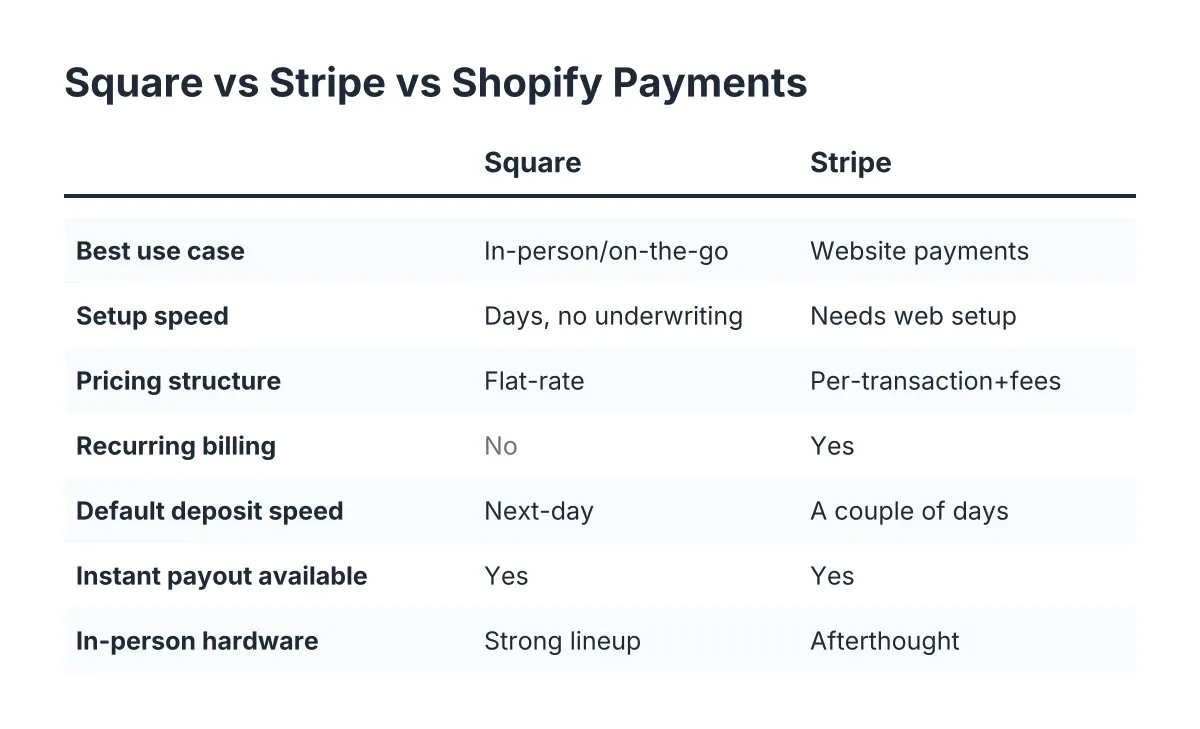
- Flat rate. One rate for everything, like 2.9% plus 30 cents. Square and Stripe use this. Simple to understand, but you overpay on debit cards and basic credit cards, which cost the processor far less.
- Tiered pricing. Transactions get sorted into "qualified", "mid-qualified", and "non-qualified" buckets, each with a different rate. The processor decides the buckets. This model is where the worst surprises live, and it is common in legacy merchant accounts sold door to door.
- Interchange-plus. You pay the actual card network cost (interchange) plus a fixed, disclosed markup, like interchange plus 0.3% and 10 cents. This is the most transparent model and usually the cheapest once you process more than a few thousand dollars a month.
If you pull your last statement and cannot tell which model you are on within two minutes, that is a signal by itself. Opacity is a pricing strategy.
How Payment Processing Integrates With Custom Business Websites
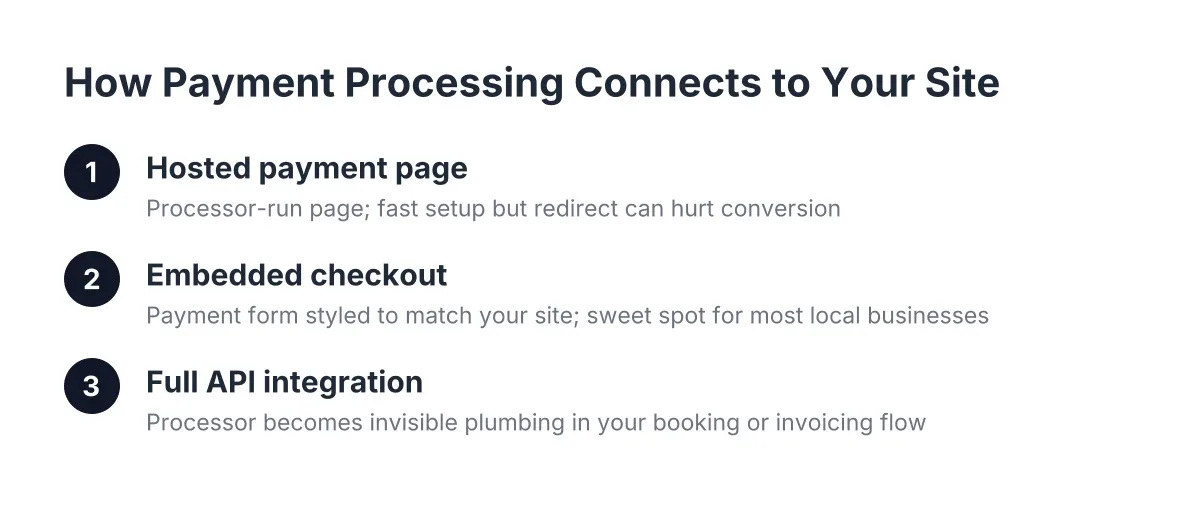
Payment processing integrates with a custom website through one of three connection points: a hosted payment page the processor controls, an embedded checkout that lives on your site, or a full API integration built into your booking or invoicing flow. Each option trades convenience against control, and the right choice depends on how your customers actually pay you.
For most local service and trade businesses, payment happens in one of a few moments. A customer books online and pays a deposit. You send an invoice after the job and they pay from their phone. Or you take a card in the driveway with a reader or a tap-to-pay app. A good integration handles all three without making anyone create an account or retype their address twice.
Hosted pages, embedded checkout, and APIs
Here is what each connection point looks like in practice:
- Hosted payment page. Your website hands the customer off to a page the processor runs. Setup is fast and the processor carries most of the security burden. The trade-off: the page looks like the processor, not like you, and the redirect kills some sales. Customers hesitate when the URL suddenly changes.
- Embedded checkout. The payment form sits inside your own page, styled to match your site, while the sensitive card data still flows straight to the processor. This is the sweet spot for most local businesses. You keep your branding and your conversion rate without taking on serious compliance work.
- Full API integration. The processor becomes invisible plumbing behind your custom booking system, quoting tool, or customer portal. Powerful, but you need a developer who knows what they are doing, and you take on more responsibility for keeping the connection secure and updated.
A custom-built website matters here in a way template builders cannot match. When payment processing integrates with custom design decisions, you control where the payment step appears, how many fields the customer fills out, and whether the whole thing works one-handed on a phone. On a locked-down template, you get whatever checkout the platform ships, in whatever order it ships it.
What Drives Payment Integration Cost and Customer Behavior
Your customers pay from their phones. The homeowner approving a $450 drain repair is standing in her kitchen with your invoice link open in a mobile browser. If that page loads slowly or the form fights her, the payment waits, and sometimes the follow-up call does too.
The data backs this up. Median mobile load times for sessions where users bounced were about 2.5 seconds slower than for sessions where they did not bounce, according to Google. Slow pages lose people. And it compounds: 79% of shoppers dissatisfied with a site's performance say they are less likely to buy from that site again, according to Google. A janky payment page does not just cost you one transaction. It teaches the customer to hesitate next time. When you understand how payment integration cost affects customer behavior, you see that the investment in a proper checkout is often recouped in recovered sales within months.
There is also a wider gap worth naming. According to BrightLocal, 89% of small and midsize businesses invest in organic SEO, yet only 40% say they have a dedicated business website. Plenty of your competitors are running payments through a Facebook page and a Venmo handle. A fast, professional payment flow on your own site is a trust signal most of them cannot match.
How to Compare Processors Without Getting Played
Comparing processors is not about finding the lowest advertised rate. It is about finding the lowest effective rate for your specific transaction mix, attached to an integration your website can actually use. Work through it in this order.
Step one: calculate your real effective rate
Pull your last three merchant statements. Add up every fee: percentage fees, per-transaction fees, monthly fees, PCI fees, statement fees, all of it. Divide the total by your card volume for the same period. That number is your effective rate, and it is the only number that matters when you compare offers.
Suppose a two-truck HVAC company in a mid-sized market runs $55,000 a month in card volume. Their statement shows a "qualified rate" of 1.79%, which sounds great. But after mid-qualified downgrades, a $25 statement fee, a $99 annual PCI fee, and per-batch charges, their effective rate lands at 3.4%. That is roughly $22,400 a year in fees, against about $15,200 at a true 2.Additionally, 3% effective rate. In that scenario, the owner is donating a used work van to the processor every couple of years without knowing it.
Step two: match the pricing model to your volume
As a rough guide for 2026:
- Under $5,000 a month in card volume: flat-rate processors like Square usually win. The simplicity is worth more than the small overpayment, and there are no monthly fees eating your margin.
- $5,000 to $20,000 a month: run the numbers both ways. Interchange-plus starts to beat flat rate here, especially if a lot of your customers pay with debit cards.
- Over $20,000 a month: interchange-plus almost always wins, and you have the volume to negotiate the markup. Ask for the markup in writing, separate from interchange.
The square-versus-everyone-else question comes down to this same math. Square is excellent at getting a new business taking payments in an afternoon. It is rarely the cheapest option once your volume grows, and its checkout customization is limited compared to what an embedded integration on your own site can do.
Step three: check the integration before you sign
A cheap rate attached to a processor your website cannot talk to is not cheap. Before signing anything, confirm:
- The processor offers an embedded checkout or API your site can use, not just a hosted redirect page.
- Invoices can be paid from a phone in under a minute, with no customer account required.
- Card readers or tap-to-pay work for in-person jobs, and those transactions land in the same reporting as online payments.
- You can export transaction data without begging support for it.
- There is no long-term contract with an early termination fee. If the service is good, they do not need to lock you in.
That last point deserves emphasis. Termination fees of $300 to $500 are common in legacy merchant agreements, and they exist for one reason: the processor knows you would leave once you did the math.
Surcharging, Deposits, and Getting Paid Faster
Lowering your rate is one lever. Changing how and when you collect is another, and for service businesses it is often the bigger one.
Should you pass fees to the customer?
Surcharging, adding a fee when a customer pays by credit card, is legal in most U.S. states but regulated everywhere it is allowed. Rules cover how much you can charge, how you must disclose it, and whether debit cards can be surcharged at all (they generally cannot). A handful of states restrict or prohibit the practice, and the rules shift, so check your state's current law before turning it on, and talk to your processor or an attorney if you are unsure.
The honest trade-off: surcharging saves you the 2-3% but some customers hate it, and in a review-driven local market that matters. A softer option is a cash discount program or simply building the cost into your pricing. If your competitors surcharge and you do not, say so. That is a selling point.
Deposits and payment links change your cash flow
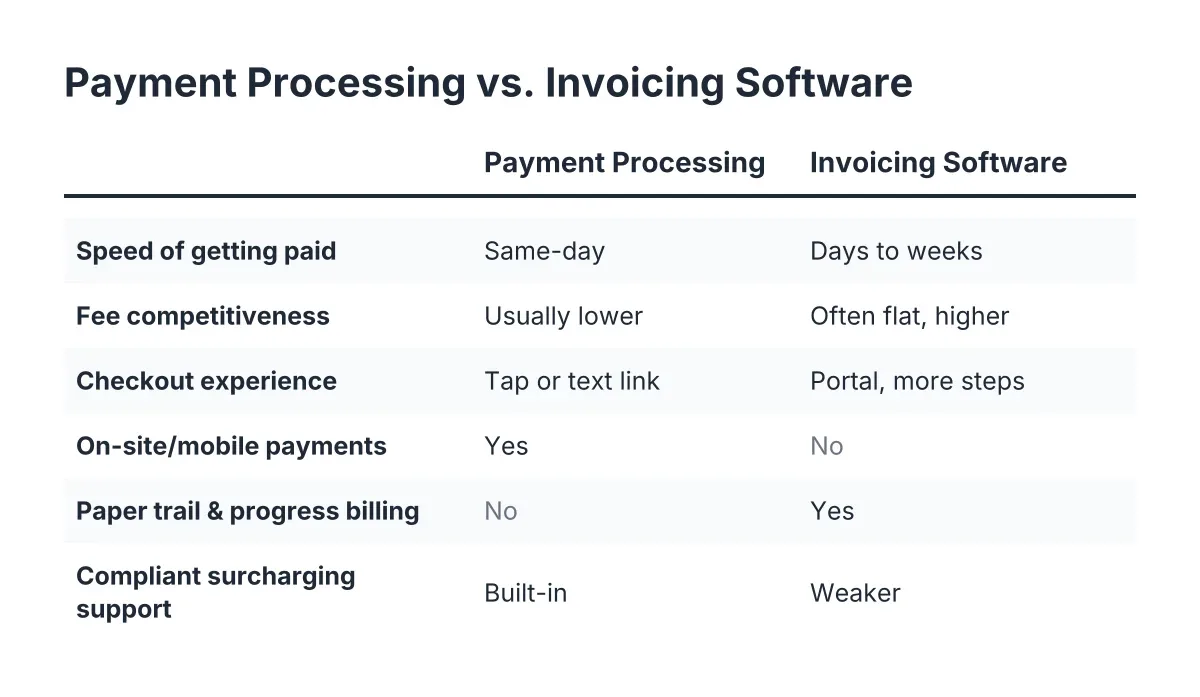
Therefore, look past the rate and at the timing of money. A website that lets customers pay a deposit at booking does two things: it filters out tire-kickers and it puts cash in your account before the truck rolls. Pair that with text-to-pay invoice links after the job and your average days-to-payment can drop from weeks to hours.
This is where the integration question and the cost question meet. Deposits, saved cards for repeat customers, and one-tap invoice payments only work when the payment system is wired into your website and your workflow, not bolted on beside it. When payment processing integrates with your custom booking flow, the customer never leaves your site, and you never chase a check.
What a Merchant Statement Review Actually Finds
Because we look at merchant statements during onboarding for website projects, we can tell you what the review turns up most often. None of this requires special software. You can do it yourself with your last statement and a calculator.
The usual suspects:
- An effective rate above 3% on a business that qualifies for far better, usually caused by tiered pricing downgrading transactions into expensive buckets.
- PCI non-compliance fees, often $20 to $40 a month, charged because nobody completed a free annual questionnaire the processor never clearly explained.
- Junk line items: statement fees, batch fees, "regulatory" fees, and annual fees that a competitive processor either waives or never charges.
- A payment page that leaks: a hosted checkout with six required fields, no mobile wallet support, and a load time that pushes customers to "I'll just mail a check".
The first three cost you a known dollar amount every month. The fourth is harder to measure but often bigger, because you never see the payments that did not happen.
One caveat worth stating plainly: fee structures vary by industry, card mix, and average ticket size, so no article can tell you your exact savings. High-ticket trades with mostly card-present transactions have different math than a cleaning company running small recurring charges. Run your own statement, or have someone qualified run it, before you switch anything.
The Bottom Line for Local Service Businesses
You do not need to become a payments expert. You need three things: your true effective rate, a pricing model that fits your volume, and a payment flow on your website that a customer can finish from their phone in under a minute.
Start with the statement. Calculate the effective rate, and if it is north of 3%, you have found money. Then look at your website's payment experience with fresh eyes, or better, watch a customer try to pay you and count the taps. The processor decision and the website decision are usually treated as separate projects. They should not be, because how well payment processing integrates with your custom site determines whether the rate you negotiated ever turns into revenue you keep.
Too many great local businesses lose to bigger, shittier competitors on details exactly like this one. The fix is not complicated. It is a couple of hours with a statement, a short list of questions for any processor who wants your business, and a payment page that respects your customer's time.
If you need web design, Revenue Goblin can help.