Payment Processing Software vs. Invoicing Software: Which Actually Handles Transactions Better?
If you run a local service business, you probably use one of two things to get paid: payment processing software that runs the card, or invoicing software that sends the bill and tacks payments on as an afterthought. Most owners never chose between them on purpose. You signed up for whatever came bundled with your accounting tool or whatever the last sales rep pushed, and now you are paying fees you have never audited on a checkout experience your customers quietly tolerate.
We review merchant statements as part of onboarding new website clients, so we see the same pattern over and over. The tool you use to collect money shapes two things: how much of each job you keep, and how easy it is for a customer to pay you. According to the Federal Reserve Bank of Boston, card processing fees typically run about 2 to 3% of every transaction. On a $6,000 HVAC install, that is $120 to $180 gone before you have paid for parts or labor. Whether an invoicing platform or dedicated payment processing software takes that cut, and how much, is worth thirty minutes of your attention.
Here are seven honest comparisons to help you figure out which one actually handles transactions better for a business like yours.
1. Invoicing software gets paid slower, and slow money costs you
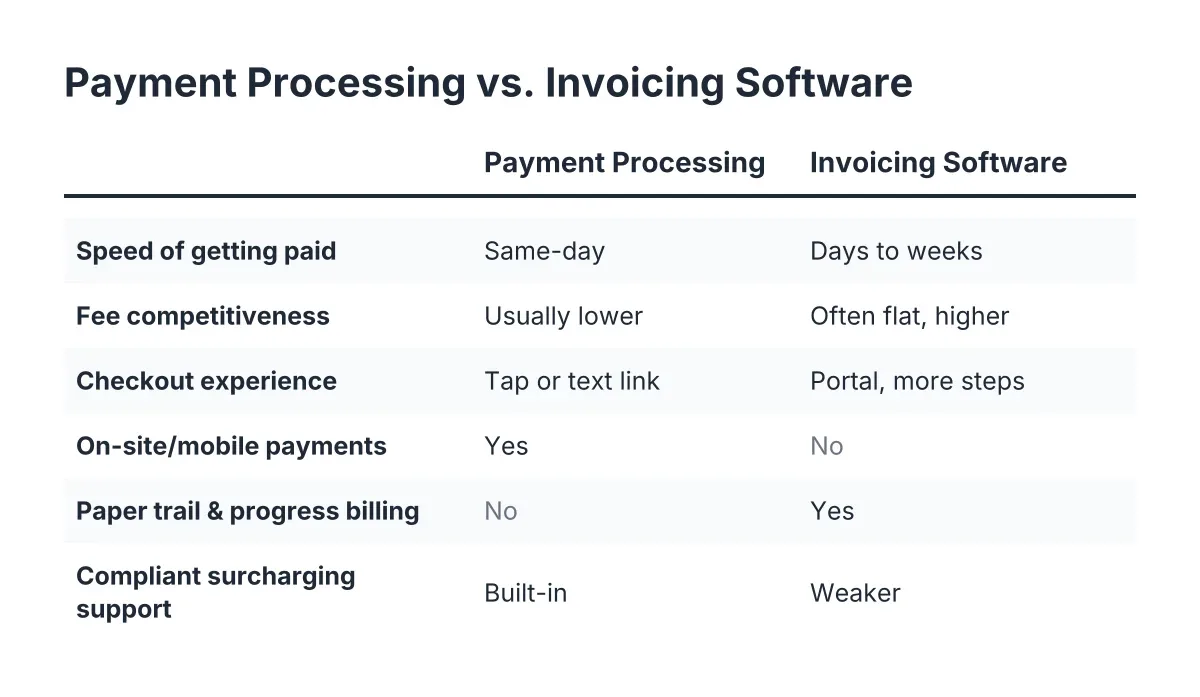
Invoicing platforms are built around a document, not a transaction. You do the work, send the invoice, and wait. The customer opens it whenever they open it, clicks through a portal, and maybe pays that week. Dedicated payment processing tools are built around the moment of payment: tap the card at the job site, send a payment link by text, done before you leave the driveway.
For a plumber or electrician, that difference is not academic. Money collected on-site is money you never have to chase. Every day an invoice sits unpaid is a day you are floating material costs on your own credit.
2. Payment processing software usually wins on fees, but only if you check the statement
Standalone processors compete on rates because rates are their whole business. Invoicing platforms treat payments as a convenience feature, and convenience features rarely get the sharpest pricing. Many invoicing tools charge a flat percentage per online payment with no interchange-plus option, no volume pricing, and no room to negotiate.
However, "usually" is doing work in that sentence. We have reviewed merchant statements where the standalone processor was the expensive one, loaded with monthly gateway fees, PCI non-compliance charges, and batch fees the owner never noticed. The only way to know is to pull three months of statements and calculate your effective rate: total fees divided by total volume. If that number is above 3%, someone is taking more than their share.
3. The checkout experience is where invoicing tools quietly lose you money
Think about what your customer sees. An invoice email with a "View Invoice" button, a portal login, a form asking for billing address, card number, and sometimes an account creation prompt. Every extra step is a place someone gives up and decides to "pay it later." According to Google, 79% of shoppers dissatisfied with a site's performance say they are less likely to buy from it again; friction at payment leaves the same bad taste.
Modern payment processing software cuts that path down to a text with a link, or a tap on a reader. For a local service business, the payment experience is part of the job. A clunky checkout after excellent work is like a great meal with a fifteen-minute wait for the check.
4. On-site and mobile payments: processing software isn't even a contest here
If you take payment where the work happens, dedicated processing wins outright. Card readers, tap-to-pay on a phone, digital wallets, and QR-based payment all live in the processor's world. Most invoicing platforms have no field hardware at all; the best they offer is emailing the invoice from your truck and hoping.
Suppose a two-person landscaping crew finishes a $1,800 hardscape job on a Friday afternoon. With a mobile reader, the homeowner taps a card and the crew drives off paid. With invoice-only software, that same $1,800 might land the following Wednesday, or after a reminder email, or after two. Same job, same customer, different tool, and a week of cash flow difference.
5. Invoicing software wins when the paper trail is the point
Fairness matters here, because invoicing tools are not the villain. If you run progress billing on construction projects, send estimates that convert to invoices, track deposits and retainage, or need line-item detail your bookkeeper can actually use, invoicing software does things a bare payment processor never will. The billing features are the product.
The mistake is not using invoicing software. The mistake is letting the invoicing platform's default payment rails set your fees and your customer experience without ever comparing them. Plenty of invoicing tools let you connect an outside processor; almost nobody checks whether they should.
6. Surcharging and fee recovery: read the rules before you pass costs along
Some owners try to escape fees entirely by adding a credit card surcharge. That can work, but credit card surcharge laws vary by state, and card networks have their own registration and disclosure requirements on top of state law. Get it wrong and you risk fines or a terminated merchant account, which is a much bigger problem than the fees were.
Dedicated processors tend to handle compliant surcharging better than invoicing platforms, with built-in disclosure and automatic caps. Either way, this is one place where talking to a professional, whether a payments consultant or an accountant familiar with your state, is worth it before you flip the switch.
7. The honest answer: most local businesses need both, wired together deliberately
Here is the conclusion the vendor comparison pages will not give you, because every vendor wants to be your only tool. Payment processing software handles the transaction better: faster collection, lower potential fees, better on-site options, and a cleaner customer experience. Invoicing software handles the business record better: estimates, progress billing, and books your accountant will not curse at.
The Federal Reserve's 2023 Small Business Credit Survey found that most small businesses face payments-related challenges, so if this feels messier than it should, you are in the majority. The fix is not picking a side. It is a deliberate setup:
- Use invoicing software for estimates, records, and any job billed in stages.
- Route the actual payment through a processor you chose on rates and experience, not defaults.
- Take on-site payment whenever the customer is standing in front of you.
- Audit your effective rate twice a year, because processors count on you never looking.
How to run your own payment processing software comparison in an afternoon
You do not need a consultant to do a first-pass audit; you need three documents and a calculator. Pull your last three merchant statements, or your invoicing platform's payment reports if that is where cards run today. Then work through this:
- Calculate your effective rate: total fees divided by total card volume, per month.
- List every recurring fee that is not a percentage: monthly minimums, gateway fees, PCI fees, statement fees.
- Time your own checkout: pay yourself $1 as a customer would and count the steps and seconds.
- Compare your effective rate against the 2 to 3% typical range; anything above it needs an explanation.
- Get one competing quote in writing, even if you stay put. Processors negotiate when you show numbers.
One caveat: effective rate alone can mislead if your transaction mix is unusual, like lots of keyed-in cards or high-ticket commercial jobs. In that scenario, a statement review by someone who reads these regularly will catch what a spreadsheet misses.
Why we care about your payment stack when we build websites
A quick note on why a website and reviews company is writing about payment processing at all. When we onboard a client, we look at the whole path from "found you on Google" to "paid you and left a review," and merchant statements are part of that review. Too many great businesses lose to bigger, shittier competitors not on the quality of work, but on the friction around it: a site that does not convert, no reviews, and a payment step that feels like homework.
The pattern we keep seeing is that owners obsess over winning the job and ignore the last ninety seconds of it. Yet that final moment, the payment, is also when a customer is most willing to leave a review, and Google hosts about 73% of all online reviews according to Exploding Topics. Fix the transaction and you are not just saving 2 to 3% in fees. You are ending every job on a note that makes the next customer easier to win.
So pick your tools on purpose. Let invoicing software keep the records, let real payment processing software move the money, and stop letting defaults decide your margins.
If you need web design, Revenue Goblin can help.