Payment Processor Comparison: Square vs Stripe vs Shopify Payments for Local Businesses
If you run a local service or trade business, you have probably typed some version of "payment processor comparison, Square vs everything else" into Google after opening a merchant statement that made your stomach drop. We get it. We review merchant statements as part of client onboarding, and the pattern is consistent: most owners are paying more than they need to, and most never chose their processor on purpose. It came bundled with something, or it was the first thing that worked. This article walks through the Square vs Stripe comparison and adds Shopify Payments to the picture.
This article compares Square, Stripe, and Shopify Payments the way we walk through it with clients: fees first, then the day-to-day experience, then the stuff nobody mentions until it costs you money. According to the Federal Reserve Bank of Boston, credit card processing fees typically run about 2-3% of a transaction. On $300,000 a year in card volume, that is $6,000 to $9,000 leaving your business. The right choice here is worth an afternoon of your attention.
Why This Payment Processor Comparison Covers Square, Stripe, and Shopify Payments
These three come up constantly because they solve the same problem in three different shapes. Square is built for taking payments in person and on the go. Stripe is built for taking payments through a website or app. Shopify Payments is built for selling products through a Shopify store.
For an HVAC company, a plumber, a landscaper, or an auto shop, that distinction matters more than any fee table. You are usually getting paid in one of three places: at the job site, over the phone or by emailed invoice, or through your website. Each processor is strongest in a different one of those lanes.
The Federal Reserve's Small Business Credit Survey found that most small businesses face payments-related challenges, according to Federal Reserve Banks. You are not behind; you are normal. But normal is expensive, so let's fix it.
Square: Built for In-Person and On-the-Go Payments
Square is the default answer for trade and service businesses, and honestly, it earned that position. You can order a reader, connect it to your phone, and take a card payment at the customer's kitchen table the same week. No merchant account application, no underwriting phone calls, no contract term.
Where Square wins
Square credit card processing shines when your payments happen face to face or on the move:
- Fast setup. Most owners are taking payments within days, not weeks.
- Free tools included. Invoicing, a basic point of sale, and simple reporting come standard.
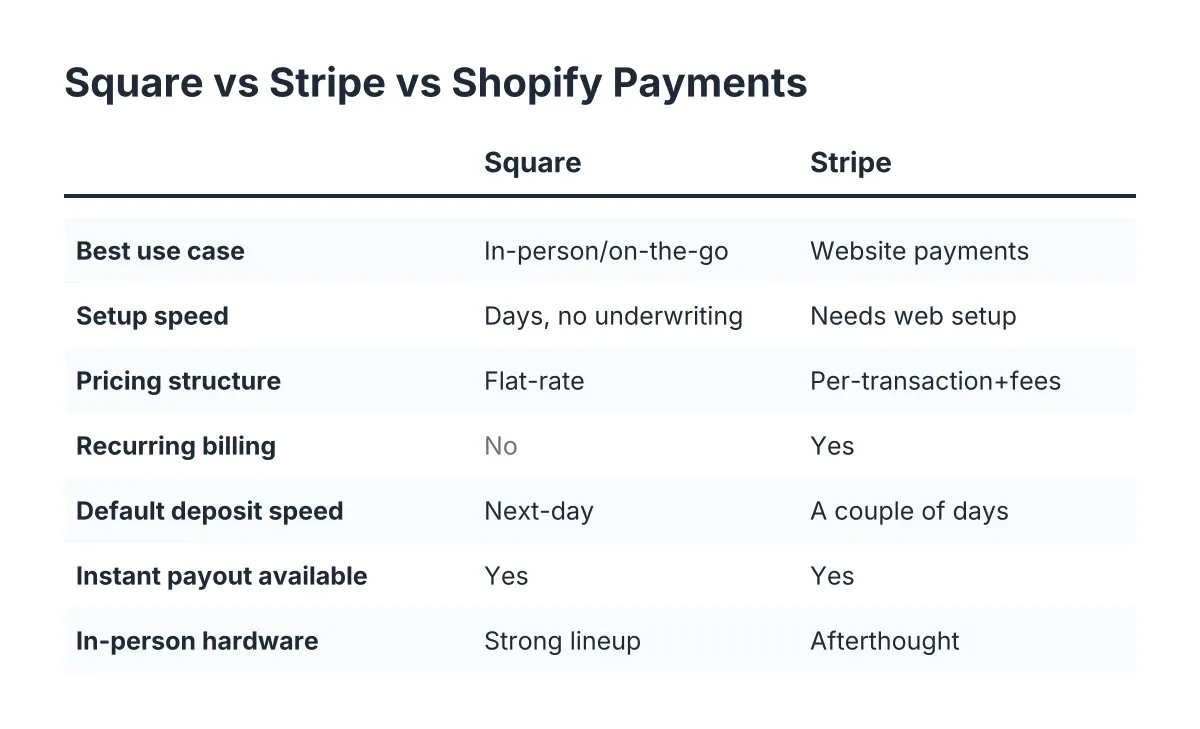
- Predictable flat-rate pricing. As of 2026, you pay one rate for tapped and dipped cards, a higher rate for keyed-in and invoice payments, and there is no monthly minimum on the base plan.
- Next-day deposits by default, with instant transfers available for an extra fee.
For a two-person plumbing outfit that invoices some jobs and swipes cards on others, that simplicity is worth real money in time saved.
Where Square costs you
Flat-rate pricing is a trade-off, not a gift. Square blends the cheap transactions with the expensive ones and charges you one rate for everything. If your average ticket is large, say a $4,000 furnace replacement, flat-rate pricing often costs more than a processor with interchange-plus pricing would.
Keyed-in and invoice payments carry a higher rate than in-person taps. Service businesses that invoice most of their work feel this. Suppose a roofing company runs $40,000 a month through emailed Square invoices; the gap between the invoice rate and the in-person rate could be well over $1,000 a year. That is an illustrative estimate, but it is the kind of number we find when we sit down with a client's statements.
Square also holds funds occasionally when a transaction pattern looks unusual, such as a sudden large ticket from an account that normally runs small ones. It resolves, but it stings when payroll is Friday.
Stripe: Built for Online and Website Payments
Stripe is the processor behind a huge share of online checkouts, and its strength is flexibility. If your website takes deposits, sells maintenance plans, or bills recurring service agreements, Stripe handles all of it cleanly.
Where Stripe wins
- Website-native payments. Stripe integrates with almost any site platform, so a customer can pay a deposit for a landscaping project without calling you.
- Recurring billing. Monthly maintenance plans, seasonal contracts, and subscriptions are core features, not add-ons.
- Detailed reporting. You can see exactly what every transaction cost you.
- Invoicing and payment links that work well for remote billing.
For a cleaning company selling monthly service plans through its website, Stripe is hard to beat. The customer enters a card once and the billing runs itself.
Where Stripe costs you
Stripe assumes you, or someone you hire, can handle a bit of setup. It is not hard for a web professional, but it is not plug-and-play for an owner between jobs. In-person hardware exists, but it is an afterthought compared to Square's lineup.
Invoice payments and keyed transactions carry added costs, and instant payouts cost extra here too. Standard payouts take a couple of business days rather than next-day, which matters if you run tight on cash flow.
Shopify Payments: Built for Selling Products Online
Shopify Payments only exists inside a Shopify store, and that is the whole story for most service businesses. If you sell physical products, parts, merch, or equipment through an online store, it is excellent. The checkout is polished, the rates are competitive at higher plan tiers, and everything lives in one dashboard.
However, you pay a monthly Shopify subscription whether or not it fits your business, and using an outside processor on a Shopify store triggers extra transaction fees on top of processing. For a pure service business, an electrician or an HVAC contractor, Shopify Payments is usually the wrong tool. You would be paying for an e-commerce platform to do a job an invoice link does better.
The exception: a trade business with a real product line. Say a landscaping company sells bagged soil blends and hardscape kits online alongside its services. In that scenario, Shopify Payments for the store plus Square for field payments is a sensible split.
Side-by-Side: How Square, Stripe, and Shopify Payments Compare on What Matters
Here is the comparison stripped down to the criteria that actually move money for a local service business.
Fees and pricing structure
All three use flat-rate pricing, so none of them is the cheapest possible option for high-volume or high-ticket businesses. Interchange-plus processors can beat all three once your volume justifies the monthly fees they charge. That said, among the three: Square and Stripe are close on in-person and online rates respectively, and both charge more for keyed and invoiced payments. Shopify's effective rate depends on which subscription tier you pay for, which muddies any clean payment processor comparison; Square and Stripe are simpler to evaluate on rate alone.
Payment experience for your customer
Google reports that 79% of shoppers dissatisfied with a site's performance say they are less likely to buy from that site again. A clunky payment page is a performance problem. Stripe delivers the smoothest website checkout. Square delivers the smoothest in-person tap. Shopify delivers the smoothest product cart. Match the tool to where your customers actually pay you.
Setup and day-to-day management
Square is the easiest to run solo. Stripe usually needs a web person for initial setup, then runs quietly. Shopify requires managing a whole storefront. If you have no office manager and no patience for dashboards, that ranking is your answer.
Getting your money
Square pays out next business day by default. Stripe standard payouts take longer. Both offer instant transfers for a fee. If cash flow is tight, that default deposit speed is worth more than a small rate difference.
Whichever You Pick: Lower Your Processing Costs
The processor is half the equation. The other half is how you use it. These steps apply to all three:
- Pull your last three merchant statements and calculate your effective rate: total fees divided by total volume. If it is above 3%, something is off.
- Move invoice payments to bank transfer where you can. ACH and bank payments cost a fraction of card rates on both Stripe and Square. On a $5,000 job, that difference is real money.
- Tap or dip cards instead of keying them in. Keyed transactions cost more everywhere. A $50 reader pays for itself fast.
- Check your state's surcharge and cash-discount rules before passing fees to customers. Credit card surcharge laws vary by state, and some states restrict or prohibit surcharging. Get this wrong and you invite complaints or worse; when in doubt, confirm the rules with an accountant or attorney in your state.
- Re-run this analysis once a year. Rates, volume, and your payment mix all drift. What was cheapest in 2024 may not be cheapest in 2026.
One honest caveat: if you process more than roughly $500,000 a year in cards, flat-rate pricing from any of these three is probably costing you money, and a dedicated merchant account with interchange-plus pricing deserves a look. That analysis gets technical fast, and it is worth having someone review your statements line by line.
How to Choose Between Square, Stripe, and Shopify Payments
Pick based on where your money actually shows up, not on brand recognition.
- Choose Square if most payments happen in person, at the job site, or over the counter, and you want the least setup. This covers most solo operators and small trade crews.
- Choose Stripe if your website is a real sales channel: deposits, maintenance plans, recurring billing, or online booking with payment.
- Choose Shopify Payments only if you sell products through an online store. For services alone, skip it.
- Choose two if your business genuinely splits: Square in the field, Stripe on the site is a common and defensible combination.
Whatever you land on, connect payment processing to the rest of the customer moment. The seconds after a customer pays and feels good about the work are the best window you will ever get to ask for a Google review, and according to Exploding Topics, Google hosts about 73% of all online reviews. A payment flow that ends with a review request turns a cost center into a marketing engine.
Run the numbers on your own statements before you switch anything. A payment processor comparison of Square, Stripe, and Shopify Payments only means something when it is measured against your actual volume, ticket size, and payment mix. Too many great businesses lose margin to a processor they picked in ten minutes three years ago. Spend the afternoon. Keep the money.
If you need web design, Revenue Goblin can help.